Uptime Monitor
Watches routers, cameras and Wi-Fi access points, and tells you in Telegram the minute one goes down.
- Role
- Solo project — design, code, tests
- Year
- 2026
- Category
- Infrastructure · Web
- Stack
- Python 3.12, asyncio, FastAPI, HTMX
The problem
In a hotel, a restaurant or a small office, a camera or a Wi-Fi access point that stops working is usually noticed days later: when someone needs the recording that is not there, or when guests complain about the Wi-Fi.
Big monitoring systems such as Zabbix or PRTG are too heavy for a place without an IT department. I install cameras, recorders and MikroTik networks for a living, so I wanted one small process and one YAML file.
The solution
- Devices are listed in
devices.yaml: a name, an IP address, ping on or off, and the TCP ports to check (554 for an IP camera, 9100 for a printer). - Every 60 seconds all devices are checked in parallel with asyncio: a ping plus a TCP connection to each port.
- A device is DOWN only after two failed rounds in a row and UP only after two good ones, so one lost ping or a flapping access point does not flood the chat.
- Telegram alerts say what failed ("ping: no reply; tcp/554: timed out") and, on recovery, how long the outage lasted.
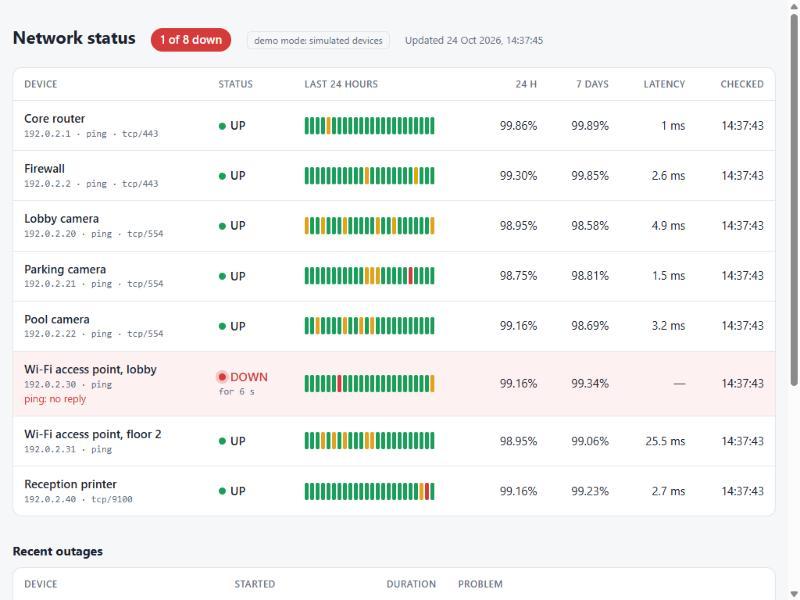
- A status page (FastAPI + HTMX, refreshed every 10 seconds) shows uptime for 24 hours and 7 days, hourly bars and recent outages.
- Device states are stored, so a restart never announces the same outage twice.
Demo
Screenshots
Tech stack
- Python 3.12
- asyncio
- FastAPI
- HTMX
- Jinja2
- aiogram 3
- SQLite
- pytest
Ping uses the system ping command instead of raw sockets, which would need administrator
rights. Device addresses are validated before they reach the command line, so an address
starting with "-" cannot be read as a ping option. Uptime is good checks divided by all checks
in the window — one SQL query.
Code highlight
The UP / DOWN decision is a pure function. The downtime starts at the first failed check and ends at the first good check of the recovery, not at the moments the alerts were sent:
def apply(state, *, device, ok, at, rules, problems=()):
    if ok:
        first_success = state.first_success_at or at
        state = replace(state, failures=0, first_failure_at=None,
                        successes=state.successes + 1, first_success_at=first_success)
        if state.status is Status.UNKNOWN:
            return replace(state, status=Status.UP), None
        if state.status is Status.DOWN and state.successes >= rules.recover_after:
            event = Event(EventKind.UP, device, first_success, state.down_since)
            return replace(state, status=Status.UP, down_since=None), event
        return state, None

    first_failure = state.first_failure_at or at
    state = replace(state, successes=0, first_success_at=None,
                    failures=state.failures + 1, first_failure_at=first_failure)
    if state.status is not Status.DOWN and state.failures >= rules.fail_after:
        event = Event(EventKind.DOWN, device, at, first_failure, problems)
        return replace(state, status=Status.DOWN, down_since=first_failure), event
    return state, None
Bug I found and fixed
Ping latency was never measured on a non-English Windows
What broke
When I ran the checks against my own network, my router was reported as UP, but its latency was always empty. The tests with English sample output had no way to catch it.
Root cause
On my computer ping answers in Russian, in the old console code page cp866:
время<1мс TTL=128. The checker decodes the output as ASCII, which keeps TTL=128 but turns
every Russian letter into a replacement character. The latency pattern looked for the unit
ms or мс, and after decoding the Cyrillic мс no longer existed.
The fix
Do not depend on the word for "milliseconds" at all. Linux and English Windows are matched by
time=12.3 ms; any other Windows language by the number right before TTL=, which every
language version prints. The tests now use the real Russian output, encoded to cp866 and
decoded exactly the way the checker does it.
_LATENCY = re.compile(r"[=<]\s*(\d+(?:[.,]\d+)?)\s*(?:ms|мс)", re.IGNORECASE)

match = _LATENCY.search(output) if ok else None_LATENCY_LATIN = re.compile(r"time[=<]\s*(\d+(?:[.,]\d+)?)\s*ms", re.IGNORECASE)
_LATENCY_BEFORE_TTL = re.compile(r"[=<]\s*(\d+(?:[.,]\d+)?)\S*\s+TTL=")
match = _LATENCY_LATIN.search(output) or _LATENCY_BEFORE_TTL.search(output)Result
- 52 automated tests, including real ping output from Russian Windows, English Windows and Linux.
- Tested against a real network: the home router, Cloudflare DNS, a closed port and an unknown host name, each with the right result and reason.
- Demo mode simulates eight devices and generates a week of history in about a second.