Network Inventory
Finds the devices on an office or hotel network, keeps a register of them and flags new devices and risky open services.
- Role
- Solo project — design, code, tests
- Year
- 2026
- Category
- Infrastructure
- Stack
- Python 3.12, asyncio, FastAPI, Jinja2
The problem
Ask a small hotel or office what is connected to its network, and the honest answer is usually "we don't know". Cameras, recorders, printers, access points and the PC someone set up for remote support years ago all sit on one flat network. Nobody notices a new device, and nobody knows that a camera answers on Telnet after a factory reset.
The EU's NIS2 Directive lists asset management among the minimum cybersecurity measures (Article 21(2)(i)). It applies to medium-sized and larger companies in specific sectors, so many small businesses are outside its scope. A list of what is on the network is still the first step of any security work. This tool helps keep that list; it does not make anyone NIS2-compliant.
The solution
- The networks to scan must be listed explicitly. Only private ranges are allowed, nothing larger than /22, and the tool never logs in or exploits anything.
- A scan pings every address in parallel with asyncio, then reads the operating system's ARP table for MAC addresses, so a PC that drops ping still shows up.
- Every live device gets a TCP connect on a short list of ports (Telnet, FTP, RDP, SMB, RTSP, Winbox…) and a reverse DNS lookup for its name.
- The MAC address gives the vendor, from a small bundled extract of the IEEE list. Randomised MACs of phones and virtual machines are marked instead of getting a wrong vendor.
- Devices are tracked by MAC in a SQLite register, so a new DHCP address is not a new device. Each scan is compared with the last one: new device, gone, IP changed, port opened.
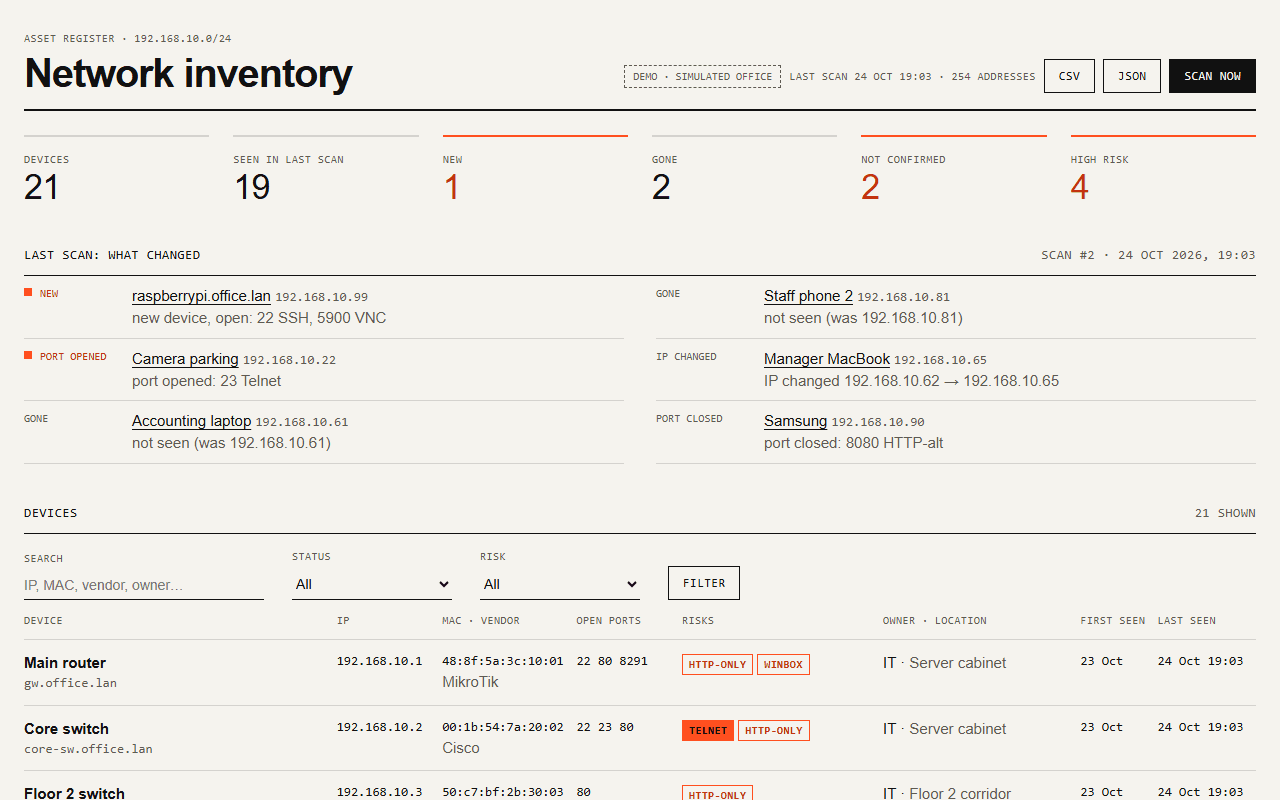
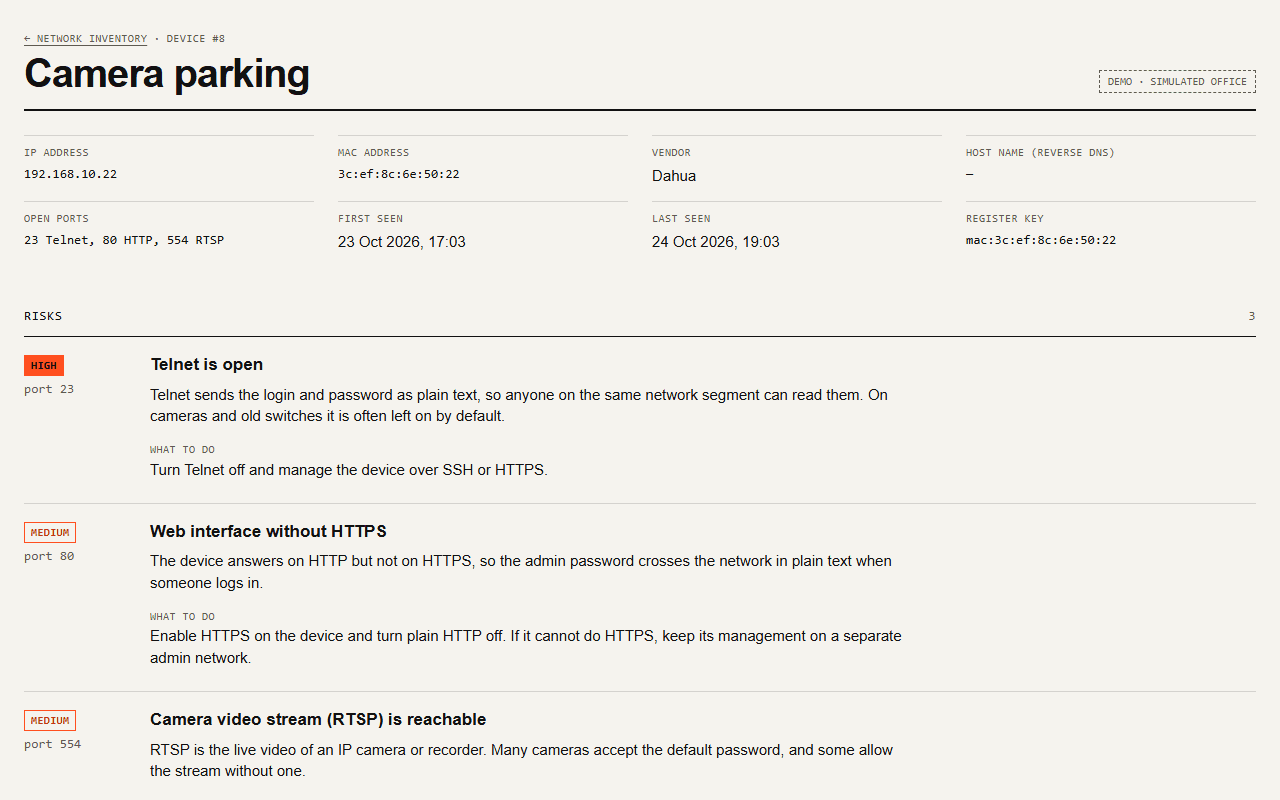
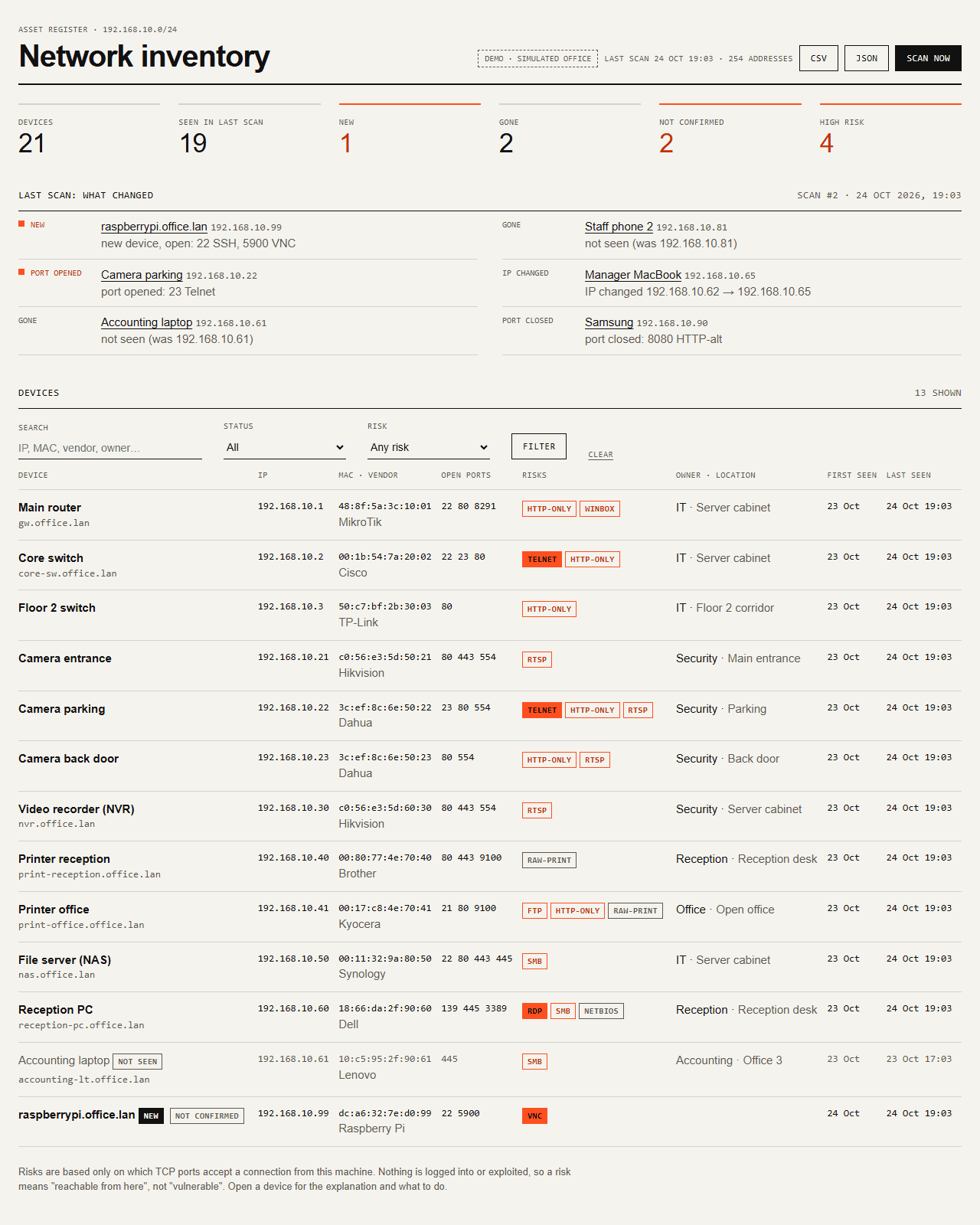
- A new device or a newly opened risky port sends one Telegram message per scan. The web page shows the register with filters, risks with plain explanations, and exports CSV and JSON.
Screenshots
Tech stack
- Python 3.12
- asyncio
- FastAPI
- Jinja2
- SQLite
- aiogram 3
- pytest
Discovery uses the system ping, arp -a and ip neigh instead of raw sockets, so it runs
without administrator rights. Their output is decoded as ASCII: on a Russian Windows the words
become unreadable, but TTL=, IP and MAC addresses survive in every language — a lesson from
the uptime monitor. Matching devices and comparing scans are pure functions, and each scan is
saved in one transaction.
Code highlight
The diff between scans is a pure function. Ports are compared with the device's last sighting, even if that was weeks ago, and a device only counts as gone if this scan covered its network:
def diff(*, last_known, previous_scan, current, in_scope):
    changes = []
    for key, now in current.items():
        before = last_known.get(key)
        if before is None:
            changes.append(Change(ChangeKind.NEW, key, tuple(sorted(now.ports)), new_ip=now.ip))
            continue
        if key not in previous_scan:
            changes.append(Change(ChangeKind.RETURNED, key, new_ip=now.ip))
        if before.ip != now.ip:
            changes.append(Change(ChangeKind.IP_CHANGED, key, old_ip=before.ip, new_ip=now.ip))
        if opened := now.ports - before.ports:
            changes.append(Change(ChangeKind.PORT_OPENED, key, tuple(sorted(opened))))
        if closed := before.ports - now.ports:
            changes.append(Change(ChangeKind.PORT_CLOSED, key, tuple(sorted(closed))))

    for key in previous_scan:
        before = last_known.get(key)
        if key not in current and before is not None and in_scope(before.ip):
            changes.append(Change(ChangeKind.GONE, key, old_ip=before.ip))
    return changes
Bug I found and fixed
Host names went missing when many addresses had no name
What broke
Before trusting reverse DNS with a whole subnet, I measured it on my Windows machine. Alone,
127.0.0.1 resolved to the computer name in 3 ms. In a batch of 61 addresses where the other 60
have no name, the same lookup came back empty. On a real network that means devices losing
their names whenever many addresses have no DNS record, which is the normal case.
Root cause
On Windows a lookup for an address without a name takes 4.98 seconds to fail. The timeout of
2 seconds only stopped the waiting: the thread blocked in getnameinfo cannot be cancelled and
stayed busy. The concurrency slot was freed at the timeout, so new lookups queued behind busy
threads in the shared pool, and their 2 seconds ran out before they even started.
The fix
Reverse DNS got a thread pool of its own, and a slot is freed only when the thread really
finishes. asyncio.shield keeps the timeout from cancelling the future, which would free the
slot early again. After the fix the same batch returns the name. A regression test reproduces
the problem with a fake slow resolver, without any network.
try:
    name, _ = await asyncio.wait_for(
        loop.getnameinfo((ip, 0), socket.NI_NAMEREQD), timeout_s
    )
except (TimeoutError, OSError):
return Noneawait self._slots.acquire()
future = loop.run_in_executor(self._pool, self._resolve, ip)
future.add_done_callback(self._release) # free the slot only when the thread is done
try:
name = await asyncio.wait_for(asyncio.shield(future), self._timeout)
except (TimeoutError, OSError, UnicodeError):
return NoneResult
- 117 automated tests, including real
pingandarp -aoutput from a Russian Windows. - Tested on a real network against this machine and the home router only: the router was found with its vendor, name and open ports in 2–3 seconds.
- A sweep of the loopback range 127.0.0.0/22 (1022 addresses, all on this machine) took 22 seconds.
- Demo mode simulates an office of 21 devices scanned twice: six changes and one Telegram alert.